FresCo: Connected Kitchen Ecosystem
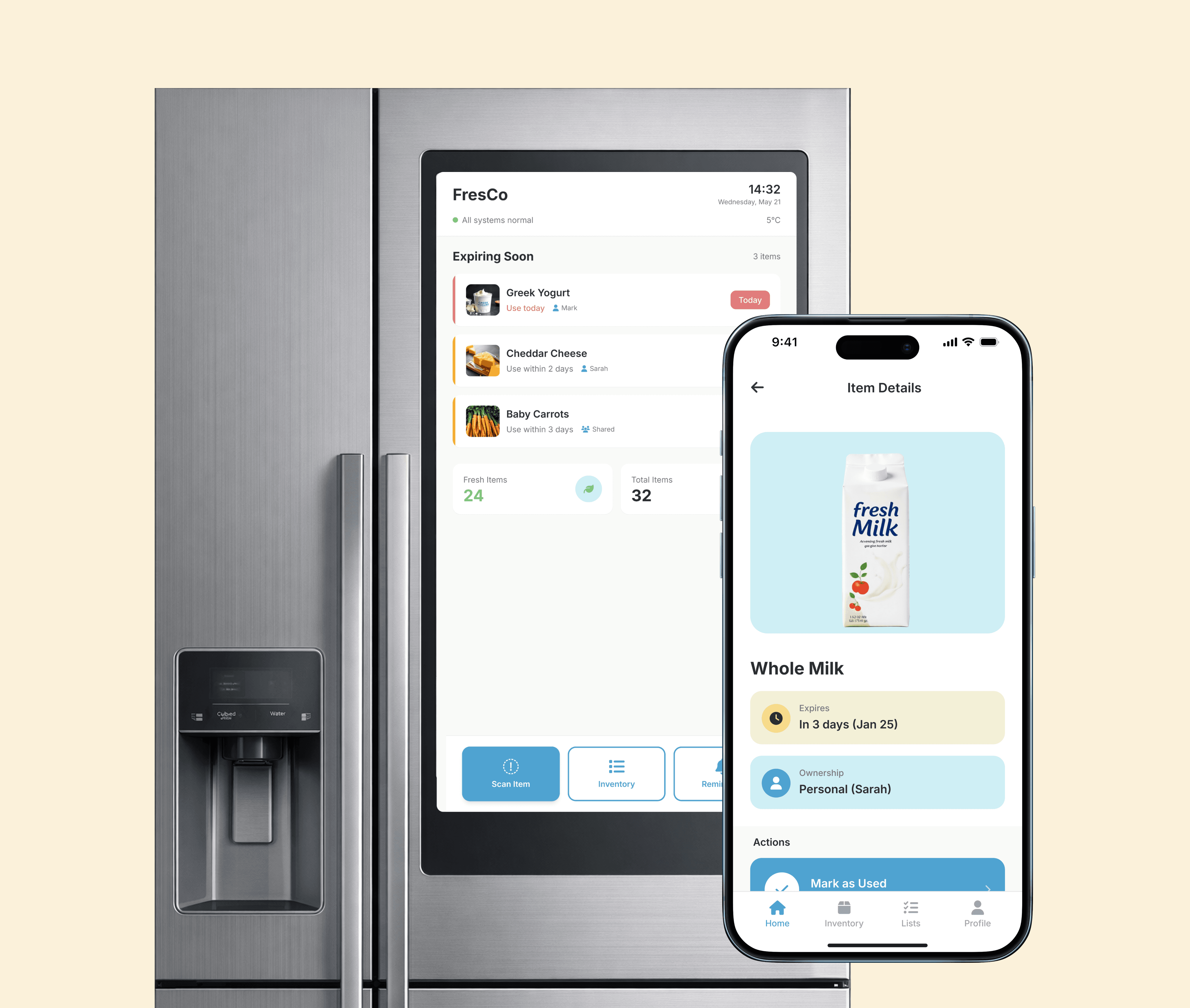
FresCo is a connected refrigerator ecosystem for shared households—combining smart fridge HMI, mobile app, and cloud sync to reduce food waste and simplify grocery coordination.
My Role
UX Designer, User Researcher
Duration
8 weeks
Team
4 (Solo designer + 3 researchers)
Tools
Figma, Miro, UX Pilot, Contextual Inquiry
THE WHY
40% of food waste in shared households happens from forgotten items and ownership confusion. Through contextual inquiries with 6 residents, we found users need visibility at the fridge—not another app to maintain.
THE SOLVE
FresCo transforms the refrigerator into an intelligent interface—embedded HMI touchscreen for glanceable status, mobile app for deep management, cloud sync for real-time coordination.
THE IMPACT
30% reduction in food waste and 25% decrease in duplicate purchases through seamless household coordination.
Want to see how we got here? Scroll to explore the journey ↓
RESEARCH
Understanding the Users—And Finding the Gaps
Contextual Inquiries
Through contextual inquiries with 6 participants living in shared spaces, we uncovered critical breakdowns in daily fridge management:
Step 1
Pre-task questions (living arrangements, current fridge habits)
Step 2
Observational tasks (fridge tour, expiry identification, meal planning)
Step 3
Post-task interviews (challenges, technology preferences)
Key Findings


Core Insight
"I know there's food in there, but I can't remember what's mine, what's about to go bad, or if someone already bought milk."
Users don't need another app. They need the appliance itself to be smarter at the moment of need.
IDEATION
Design Principles


Solution Architecture
Based on research insights, I established four core principles to guide all design decisions:

IoT System Integration
Hardware sensors, edge processing, cloud intelligence, and mobile interface working in harmony
Hardware Layer
Refrigerator Sensors
1
Interior cameras (top + side mounted)
Weight sensors on shelves
Door-open detection
Temperature monitoring
10.1" touchscreen HMI
WiFi connectivity module
Edge Processing
On-Device Intelligence
2
Local data processing
Image recognition (barcode)
Offline mode capability
Real-time HMI updates
Privacy-first design
Sync queue management
Cloud Sync
Central Intelligence
3
Real-time synchronization (<1s)
Multi-device coordination
Smart notifications
ML-powered predictions
Household data storage
Analytics & insights
Mobile Interface
Companion App
4
Deep inventory management
Camera-based scanning
Push notifications
Offline data caching
Household coordination
Cross-platform (iOS/Android)
Design System
Colors

Typography

FINAL DESIGNS
Refrigerator HMI: Intelligence at the Point of Need
The fridge interface provides glanceable awareness when it matters most—standing at the refrigerator deciding what to cook. Four core screens support the entire household journey from awareness to action.


Mobile App: Deep Management On-the-Go
Michael just returned from the grocery store. He opens FresCo, taps the scan button, and points his camera at the Bananas he bought. The app instantly recognizes it, auto-fills the expiry date (6 days), and prompts him to mark it as "Personal." One tap confirms—the item appears in his inventory and syncs to the fridge display within seconds. His housemates receive a subtle notification: "Michael added bananas (personal)."
Key Mobile Screens
The mobile companion handles tasks requiring focus: detailed browsing, batch scanning, and household coordination.

REFLECTIONS
What I Learned By Building This
APPLIANCE- FIRST THINKING
Designing for a refrigerator taught me that less is exponentially more. Traditional app design optimizes for engagement; appliance design requires glanceable efficiency. Every HMI screen was designed for <5 second interactions—if it takes longer, it doesn't belong on the fridge.
TRUST THROUGH TRANSPARENCY
Users only trust automation when they understand the "why." Every smart suggestion now includes visible rationale—recipe suggestions show which items are expiring, grocery lists explain the usage pattern that triggered them.
WHAT I'D DO DIFFERENTLY NEXT TIME:
The scan-to-add flow assumes users will scan items immediately after shopping. User testing revealed many unpack groceries in batches or forget to scan. I would design for "retroactive scanning" and bulk-add features from the start.
I designed all screens in Figma without testing on actual refrigerator hardware. This means I didn't account for real-world factors like screen glare in kitchen lighting, fingerprint visibility on glossy displays, or how the interface looks when the fridge door is partially open. Physical prototyping would have revealed these usability issues earlier.