MoodSense
A smartwatch app that detects stress and helps users find calm, right from the wrist.
MoodSense is a smartwatch app that detects stress and offers quick ways to cope, from breathing exercises to playful mini-games. Designed with a calming look and friendly interactions, it helps users manage stress in simple, everyday moments.
Timeline
Jan 2024 – May 2024 (IoT Class Project)
May 2024 – Aug 2024 (Independent extention)
Platform
Smartwatch
Overview
MoodSense is a wearable system that detects real-time mood using biometric signals and supports users with personalized coping strategies.
The project originated in HCIN 722 (IoT class), where my team and I developed a prototype wearable for mood detection. Using heart rate and galvanic skin response sensors, the system classified emotions across five levels and offered relaxation options such as breathing exercises, music, and games.
In the summer, I decided to extend the project independently and reimagine it as a smartwatch application. My focus shifted from building a hardware proof-of-concept to designing a lightweight, wearable experience. The smartwatch version provides real-time mood feedback, subtle haptic alerts, and quick access to coping tools directly from the wrist. This extension transformed the initial class project into a more practical and user-centered solution for everyday mental health support.
The Problem
Mental health challenges such as stress and anxiety are widespread, yet most existing tools for tracking emotions are either subjective (like self-reported surveys) or impractical for daily life. Traditional methods fail to capture the real-time, dynamic nature of emotions, leaving users without timely support when they need it most.
While wearables like fitness trackers monitor physical activity and heart rate, they rarely provide meaningful insights into mood or offer immediate coping strategies. This gap creates an opportunity for a system that can not only detect changes in mood accurately but also deliver personalized, in-the-moment interventions to help users regulate stress in everyday contexts.
The Solution
As part of HCIN 722 (IoT class, Jan–May 2024), my team and I designed and built a wearable prototype for mood detection. We drew inspiration from Biodot, a simple sticker that changes color with body temperature to signal stress. While Biodot raised awareness of mood states in a lightweight way, we wanted to create a system that offered greater accuracy and real-time support through biometric sensors.
Our prototype combined a heart rate sensor and a galvanic skin response (GSR) sensor to classify mood into five levels, ranging from Very Anxious to Very Calm. A Wio Terminal interface allowed users to view their current mood, log historical data, and access built-in relaxation options. To support stress management, the device offered three coping strategies:
Guided breathing exercises
Calming music playback
A simple Tetris game for focus and distraction
This IoT prototype demonstrated the feasibility of using physiological signals to monitor emotional states in real time, while also providing on-the-spot coping tools that could help users regulate stress.
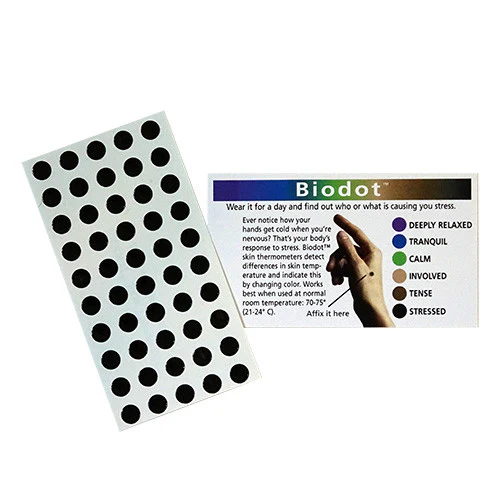
Biodot: a stress-awareness sticker that inspired our prototype.
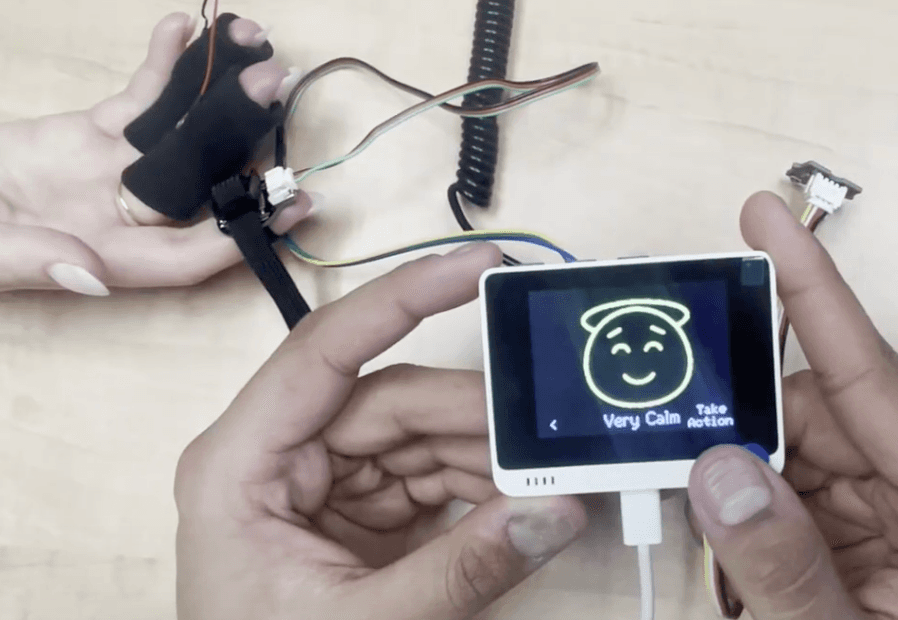
Picture of our prototyping showing the components that are unsuitable for everyday use.
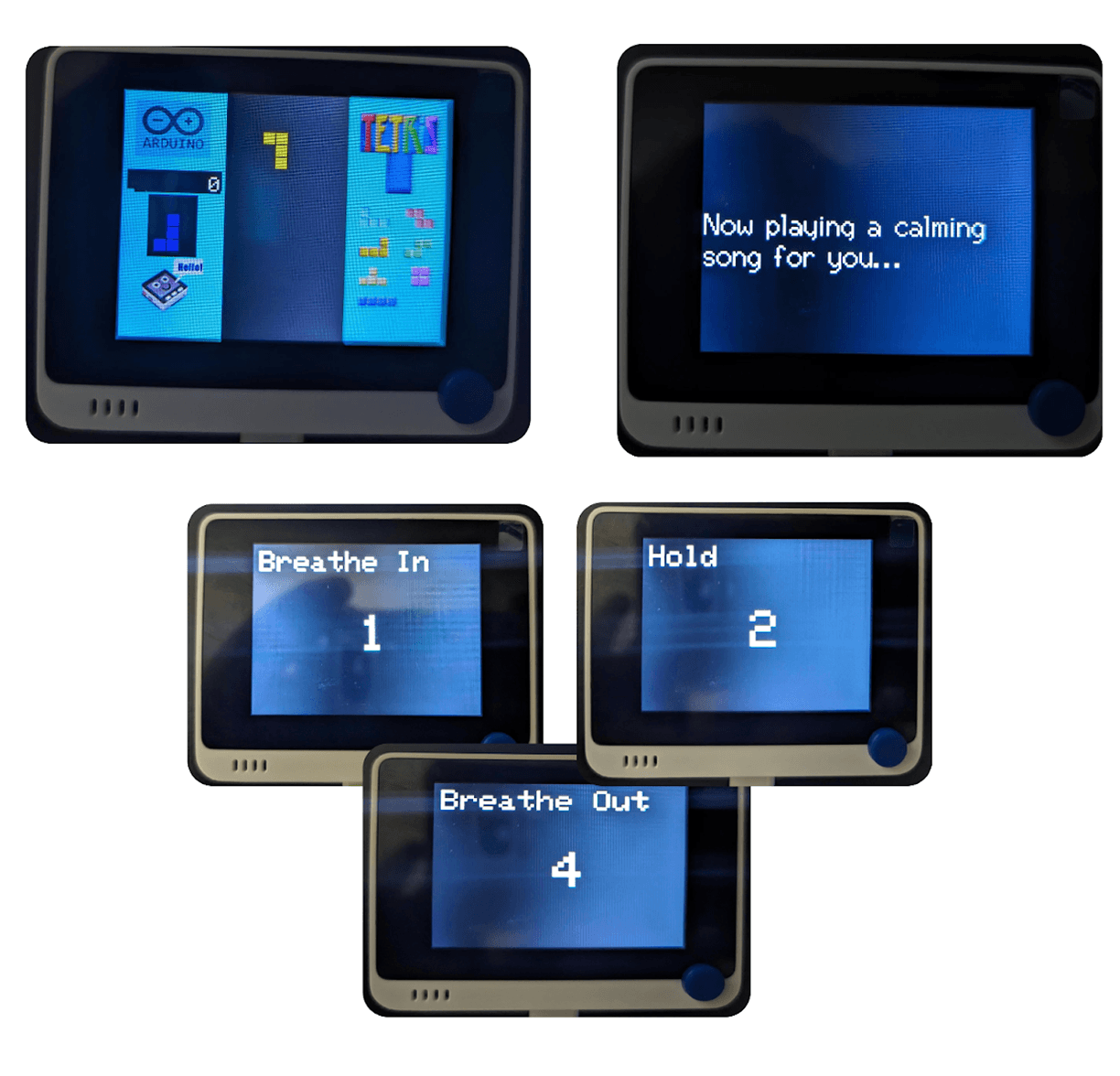
The screen for the Tetris Game, The UI while the music is playing, The Box breathing exercise with the instructions and the countdown
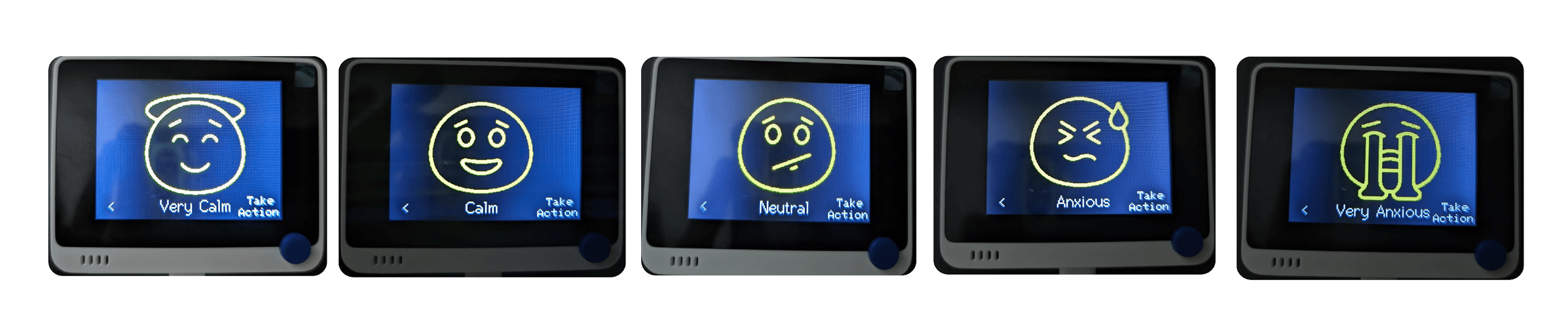
The interface for each of our five mood states
My Role & Approach
In the IoT class project, I acted as both developer and interaction designer, coding the prototype with Arduino to integrate the heart rate and galvanic skin response sensors with the Wio Terminal. Alongside the technical build, I designed the user flow and interface screens that enabled users to check their current mood, view historical trends, and access relaxation tools such as breathing exercises, music, and games. This combination of coding and UX work ensured the prototype was not just functional but also offered a clear and usable experience.
During the summer, I chose to extend the project independently by reimagining it as a smartwatch application. My focus shifted toward user-centered design, creating streamlined flows and high-fidelity screens that emphasized subtle, real-time interactions like haptic nudges and one-tap coping actions. By translating the prototype into a smartwatch experience, I transformed it from a bulky proof-of-concept into a practical, wearable solution that could better support users’ mental health in their daily lives.
Research & Discovery
What the Research (and Prototype) Taught Us
While our prototype worked, both our research review and user testing highlighted key gaps:

Insight 1
Limited accuracy from narrow signals
Relying only on heart rate and GSR failed to capture the full range of emotions. Research shows accuracy improves when combining multiple signals like temperature, breath rate, and activity.

Insight 3
Coping strategies need personalization
Generic relaxation methods are not effective in every context. Research highlights the need for personalized interventions that adapt to user environments.

Insight 2
Bulky hardware limits usability
The prototype required both finger and wrist sensors connected to a terminal, making it impractical for everyday use.
Define
Combining the above insights into four high-level goals
Based on our research findings and prototype limitations, I outlined four design goals to shape the extension of our mood detection system into a smartwatch application.

Goal 1
Strengthen emotional accuracy
Leverage smartwatch sensor capabilities such as heart rate, motion, and potential future signals like temperature or HRV to deliver more reliable mood detection.

Goal 2
Support continuous monitoring
Design for passive, always-on mood tracking that works in the background without requiring the user to initiate interactions.

Goal 3
Keep replies flexible, not robotic
Provide glanceable visuals and subtle haptic cues on the small watch screen, enabling users to quickly check their mood and take action without breaking focus.

Goal 4
Personalize coping strategies
Offer adaptable interventions like breathing exercises, calming music, or focus games tailored to user preferences and daily contexts.
With these design goals in place, I translated them into a set of core smartwatch features. Each feature was carefully aligned to address the limitations of the original IoT prototype while taking advantage of the smartwatch’s unique strengths in real-time monitoring, subtle interactions, and everyday usability.
Key features
Real-time mood detection
Continuously monitors biometric signals like heart rate and GSR to classify the user’s emotional state into five levels, from Very Anxious to Very Calm.
Subtle haptic alerts
Notifies the user with gentle vibrations when stress levels rise, allowing for discreet awareness without disrupting their environment.
Quick coping actions
Provides one-tap access to relaxation methods such as breathing exercises, calming music, or a focus game directly from the watch.
Mood history at a glance
Displays recent trends in a simple, glanceable format, helping users reflect on their emotional patterns over time.
Context-aware interventions (future vision)
Adapts coping strategies to the user’s environment, offering subtle breathing prompts during work or suggesting calming music during a commute.
Ideate
Interaction Flow
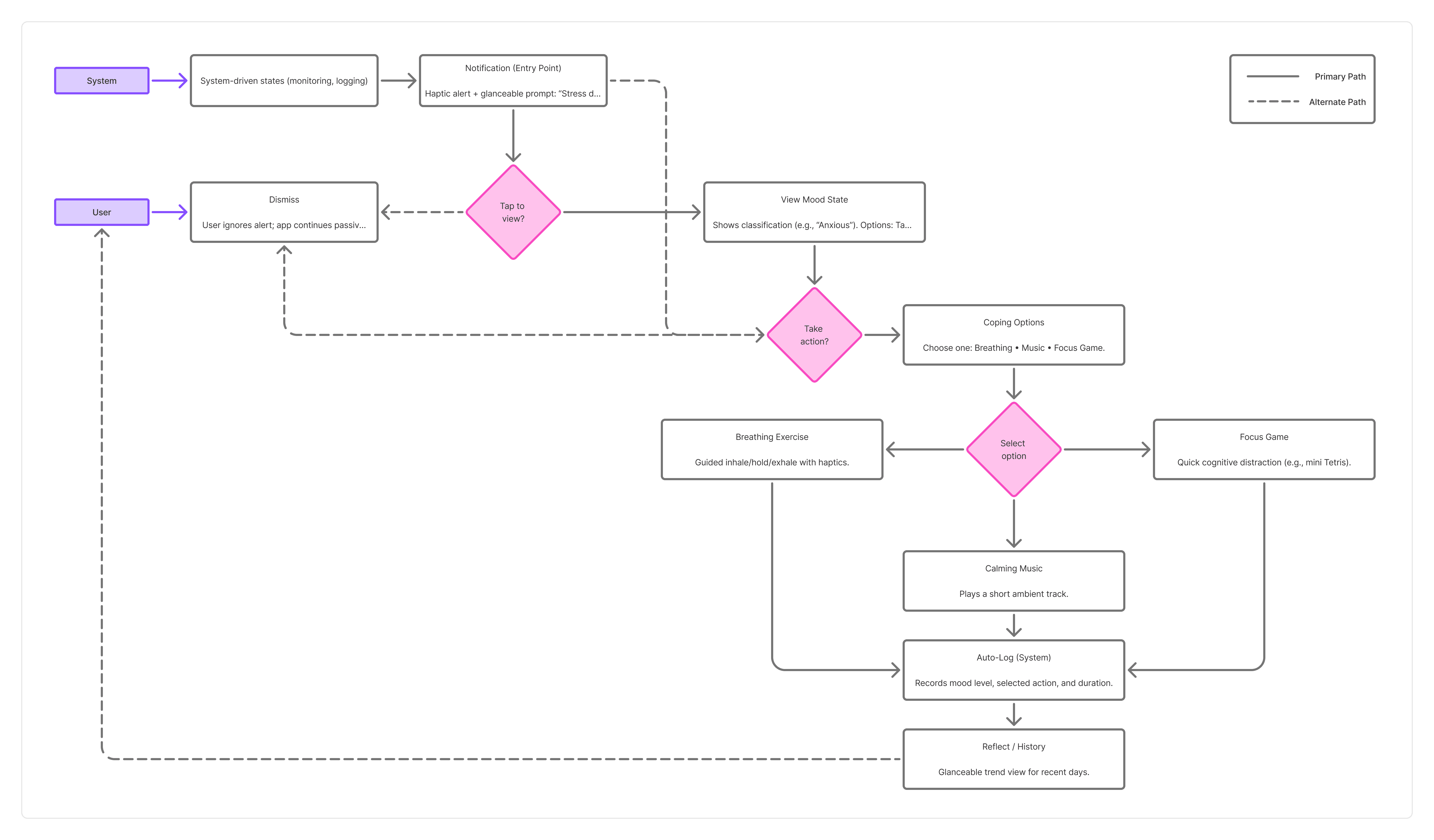
To translate the goals into a clear interaction model, I created a user flow. This process helped me map how users move from system-triggered detection to notifications, decisions, coping actions, and reflection. By visualizing the paths and edge cases, I ensured the experience remained lightweight, intuitive, and supportive in real time.
Sketches
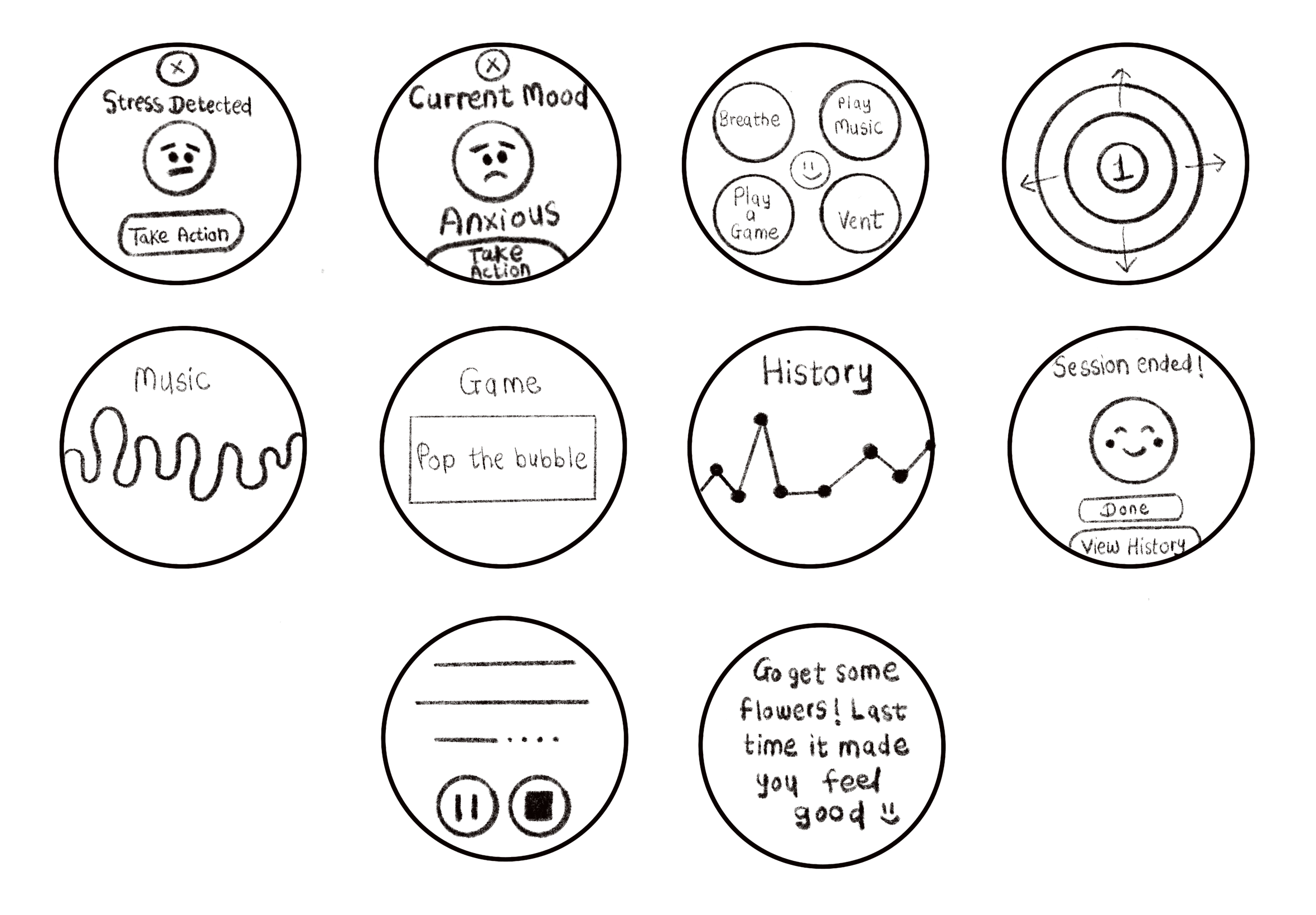
Before moving into high-fidelity designs, I created quick hand sketches of smartwatch screens and flows. These helped me experiment with different ways to present mood states, alerts, and coping options on a small, round interface.
The sketches allowed me to:
Explore multiple layout directions quickly without being constrained by pixels.
Visualize how users might move through notifications, mood states, and coping tools.
Identify information hierarchy challenges unique to a watch’s limited screen size.
This stage was essential for translating abstract goals into concrete design directions that could be tested and refined in the next phases.
Design
Final UI Design
After exploring ideas through sketches, I moved directly into high-fidelity design. Since I used the Material 3 Wear OS kit in Figma, I was able to apply established smartwatch design patterns right away without needing a separate wireframing phase. This helped me focus on refining the look, feel, and personality of the app while ensuring consistency with the Wear OS system.
For the final stage, I translated my concepts into high-fidelity smartwatch screens using Figma and the Material 3 Wear OS design system kit, designed specifically for the X-Large Pixel Watch screen size. Since this was my first time designing for a smartwatch, I prioritized clarity, accessibility, and playful interactions that feel natural on a small, glanceable display.
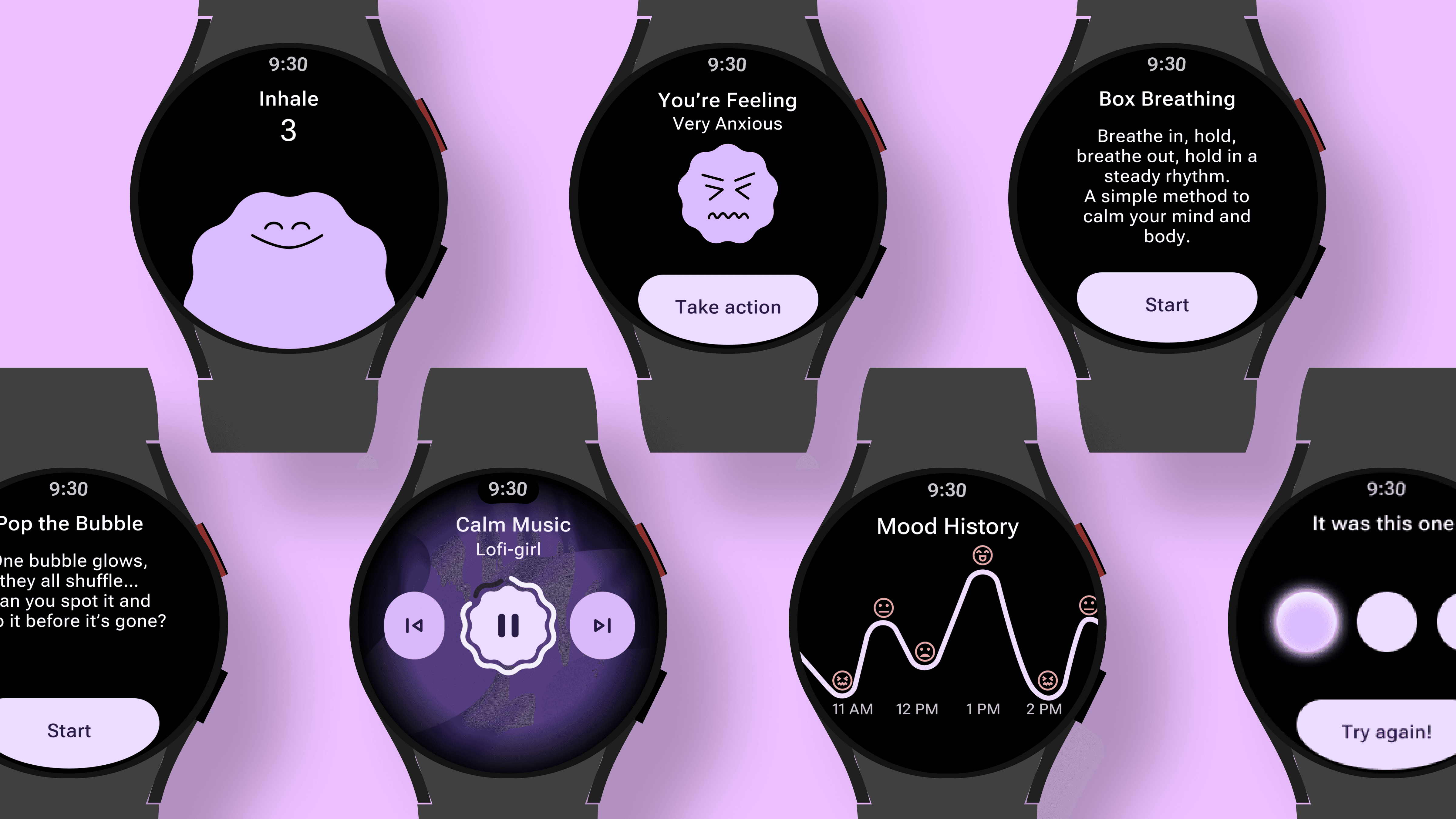
I chose purple as the primary color because it is gentle on the eyes, carries a calming quality, and aligns with Pixel’s existing system theme, making it easier to implement in development. To soften the overall experience, I incorporated fun smiley-style illustrations inspired by Headspace, giving the UI a friendly and approachable personality. Together, these choices created a design language that feels both supportive and engaging, helping users manage stress while enjoying a lighthearted interface.
Core Flow
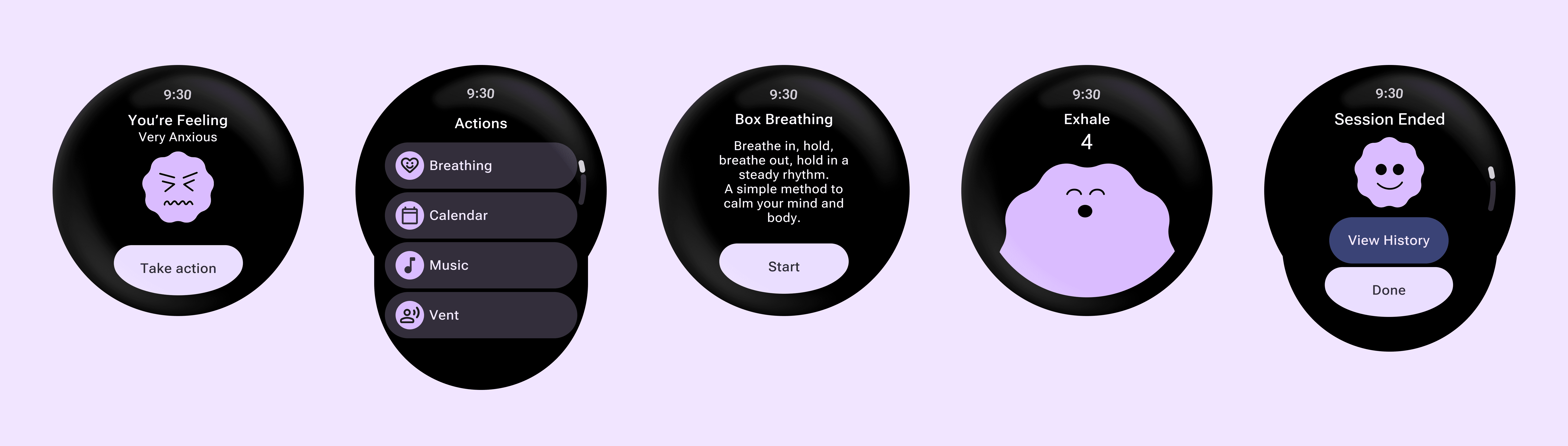
MoodSense guides the user step by step — from stress detection to relief. It starts with a Notification that alerts them when stress is high. The Current Mood screen shows their state with a friendly face and a “Take Action” button. The Action List offers quick choices like breathing, music, playing a game, or venting. Finally, the Session End screenreassures the user and logs their progress.
Feature Sets
Beyond the core flow, MoodSense includes additional tools that give users more ways to manage stress. These features were designed to be light, friendly, and quick to access on a smartwatch.
Music Player
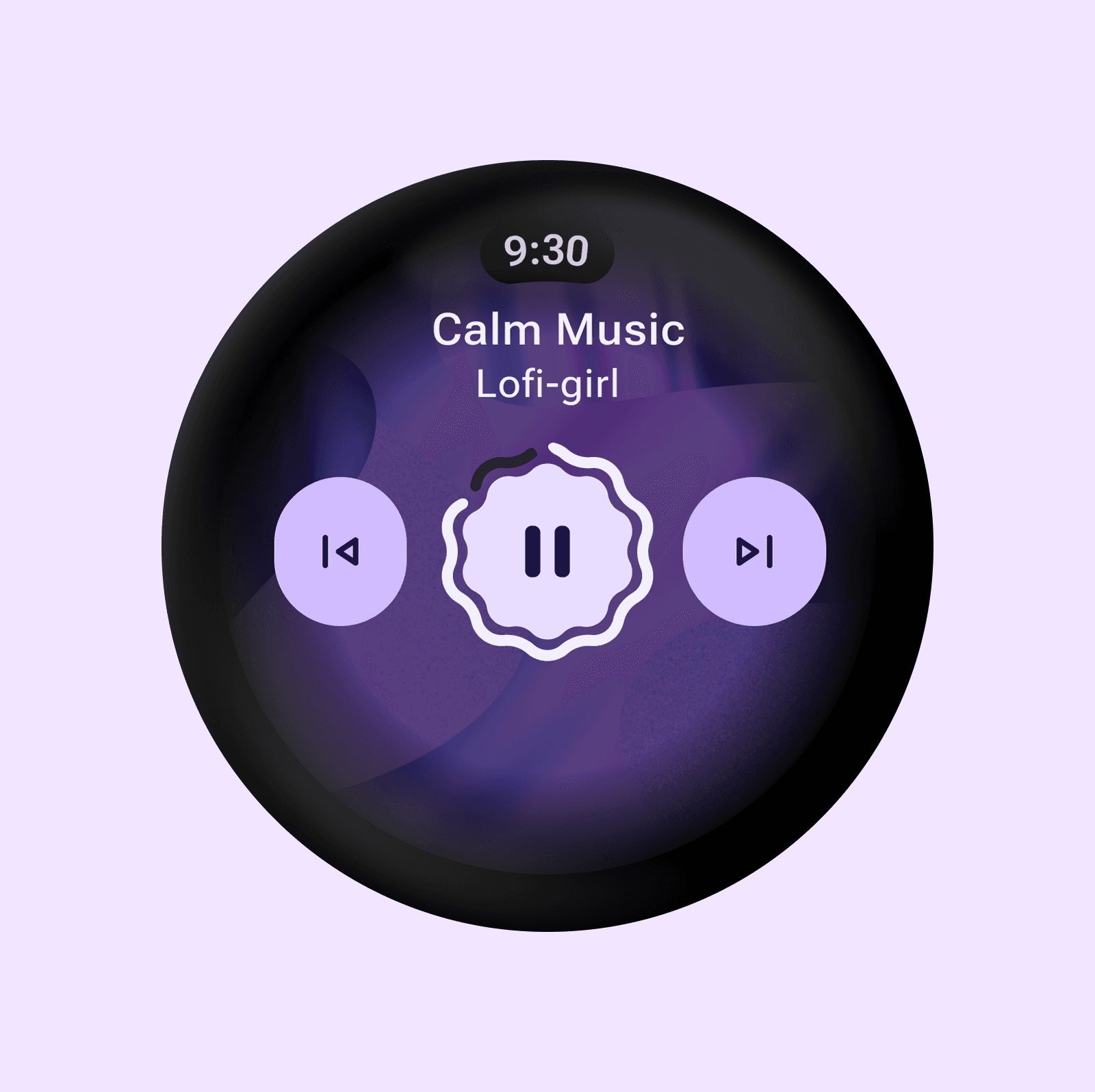
A simple, glanceable music player that lets users relax with calming music.
Mood History
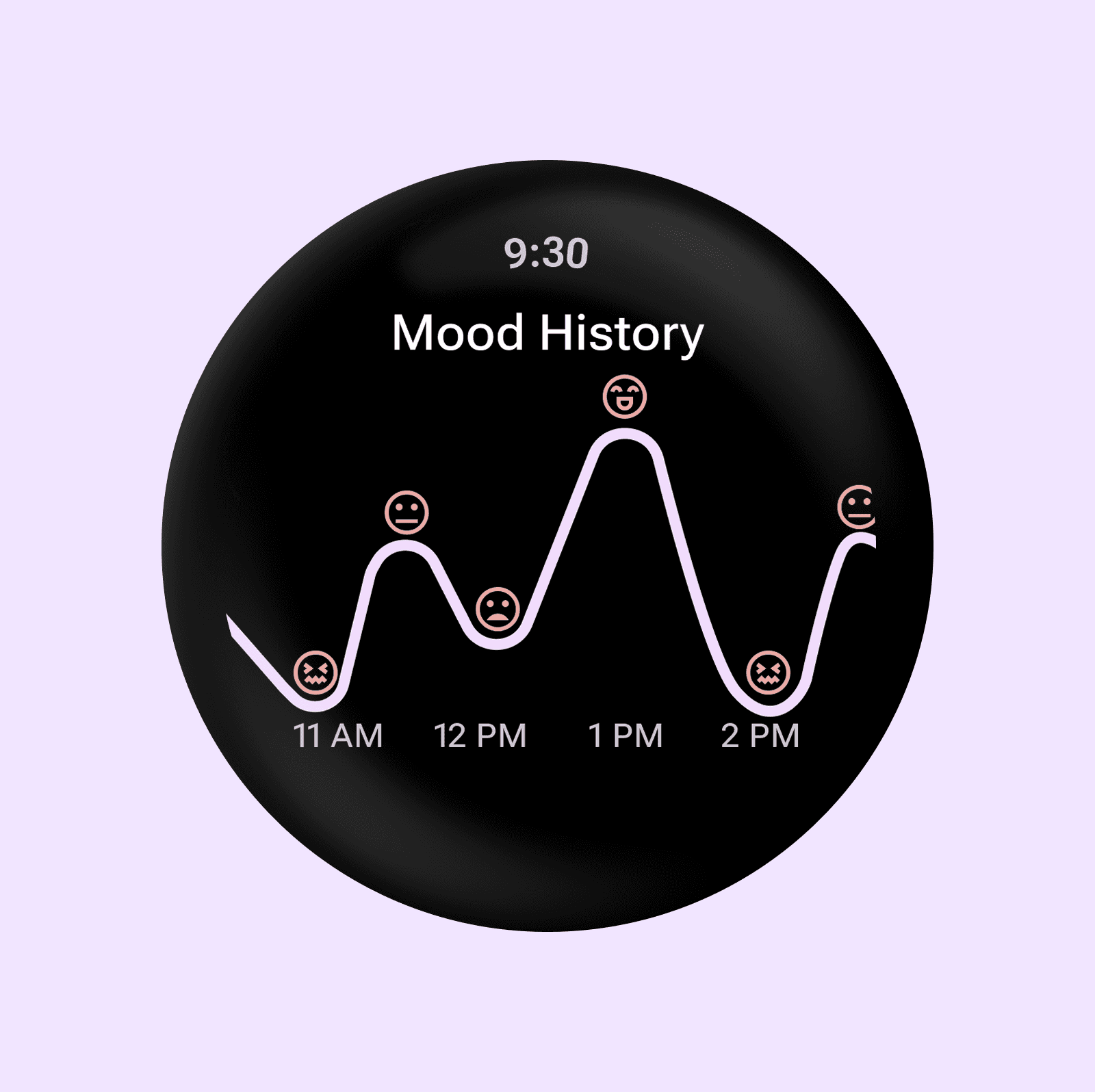
A clear view of recent mood trends, helping users reflect on patterns over time
Vent Out
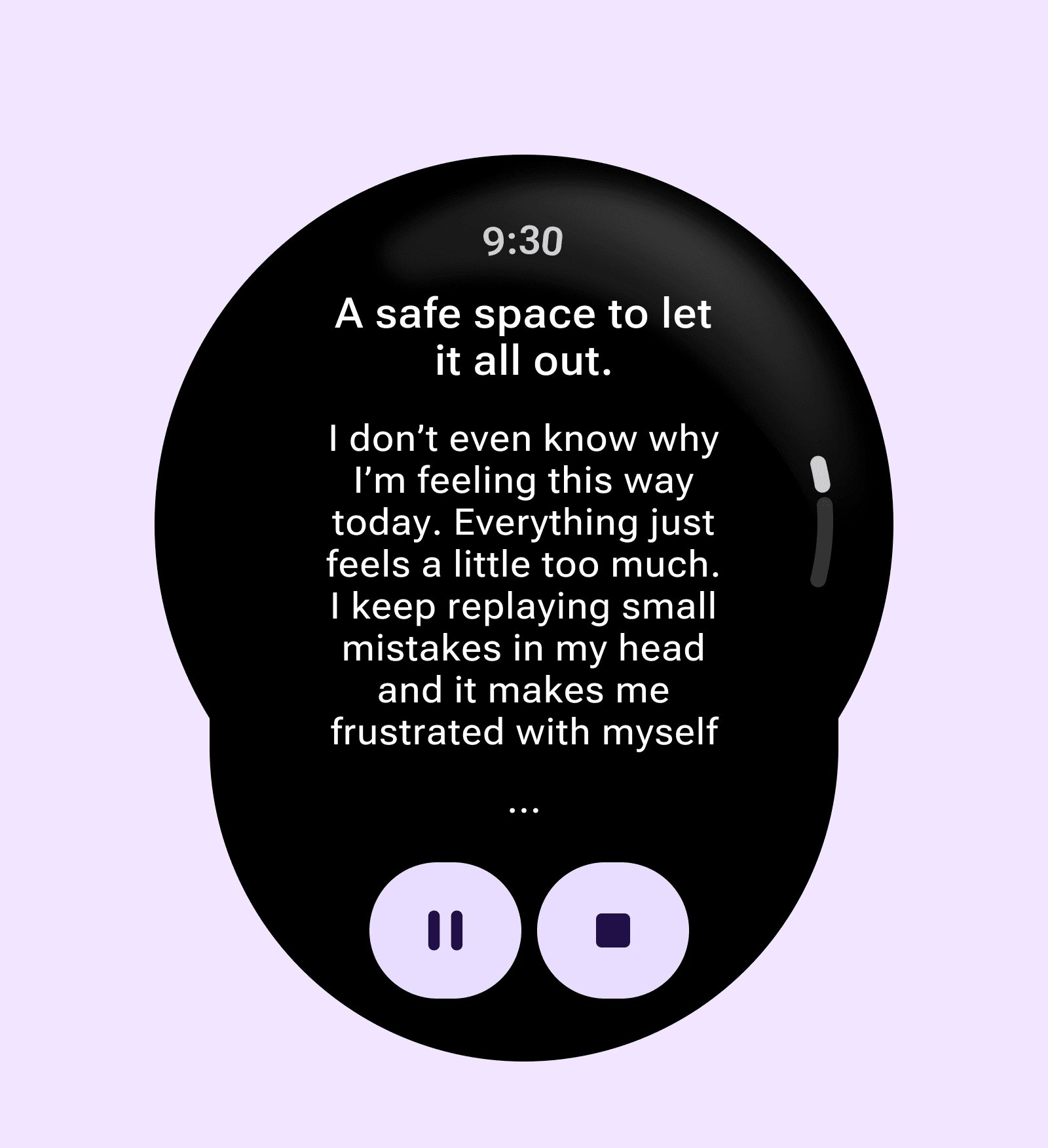
A safe space to quickly express feelings by jotting down a note or recording a thought.
Wellness Tips
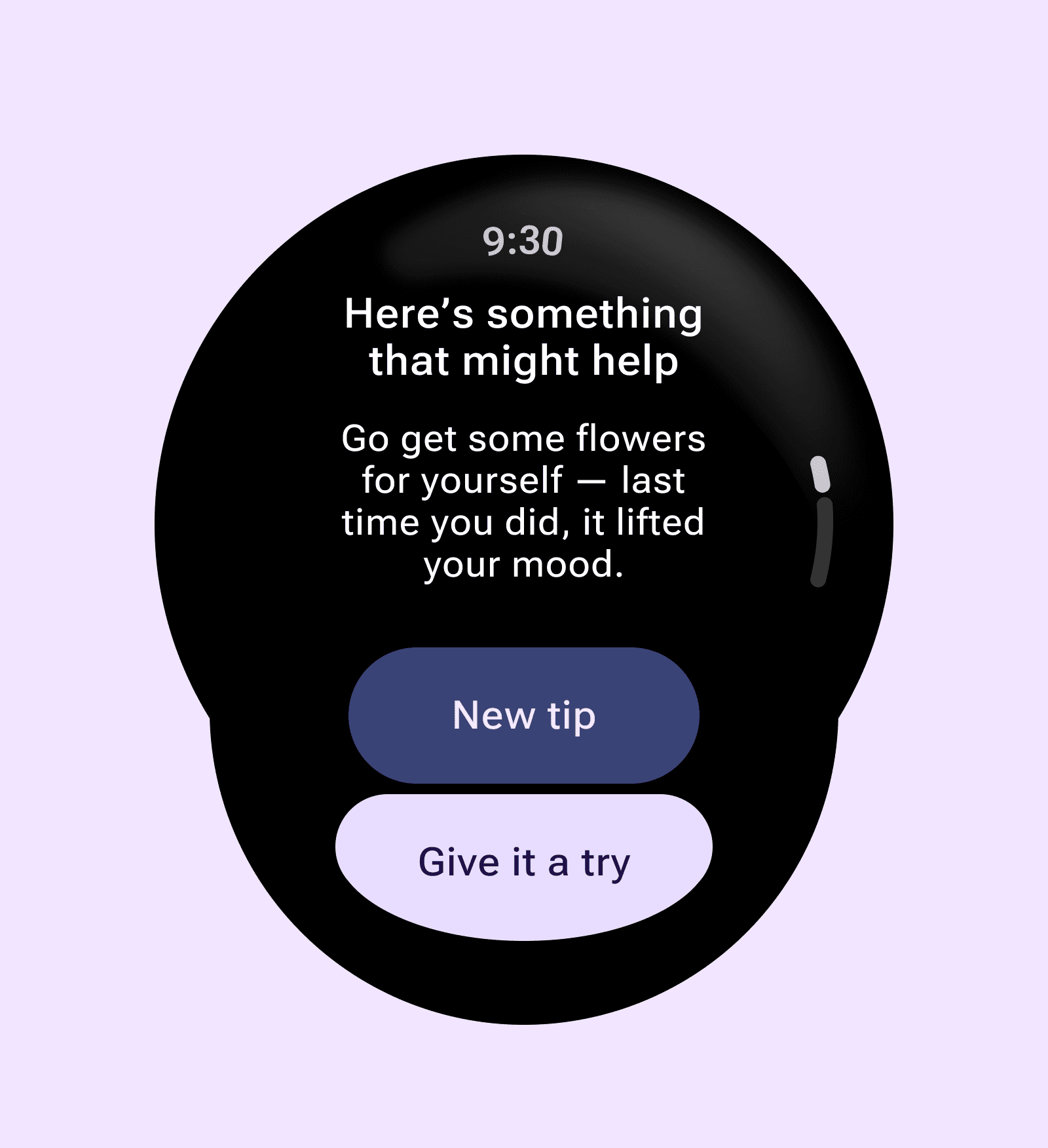
Small nudges for self-care, like ‘Buy yourself flowers’, with one-tap navigation to nearby shops.
Each of these modules adds variety to the experience while keeping the focus on emotional support.
Interactive Exercises
Interactive activities make MoodSense more engaging while offering immediate stress relief. Two key exercises were designed: Box Breathing and Pop the Bubble.
Box Breathing
Guided box breathing with equal inhale, hold, exhale, and hold counts. A simple rhythm to calm the body and mind.
Pop the Bubble
A playful memory game that keeps users focused while gently distracting from anxious thoughts.
Reflection & Learnings
This was my first time designing for a smartwatch, and I learned how important it is to keep screens clear, quick, and playful. Using the Wear OS kit helped me follow platform patterns, while adding purple tones and smiley illustrations gave the app a calming and friendly feel.
Next Steps
Detect a wider range of moods beyond stress.
Add personalized suggestions with AI.
Test flows on real smartwatch hardware.
Explore Google Fit/healthcare integration.
More Case Studies